POS Daily Meal Count Extract
Reports > Point of Service > POS Daily Meal Count Extract
The POS Daily Meal Count Extract produces an CSV file with POS information by date.
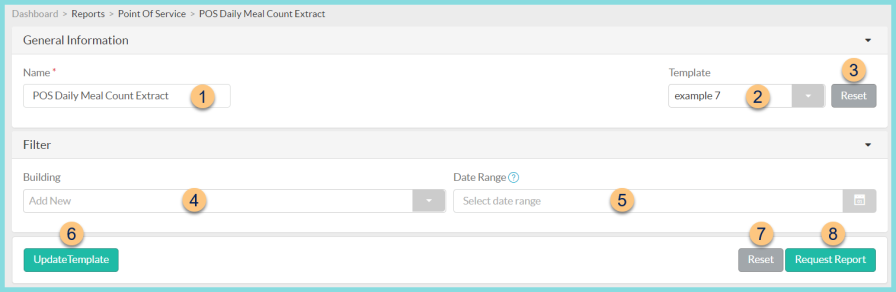
-
Name - enter a report name
Default: POS Daily Meal Count Extract -
Template - select a report template
-
Reset - click to reset to default options
-
Building - filter by cafeteria
-
Date Range - filter by transaction date range
-
Save as Template - click to save the selected filters and columns as a template
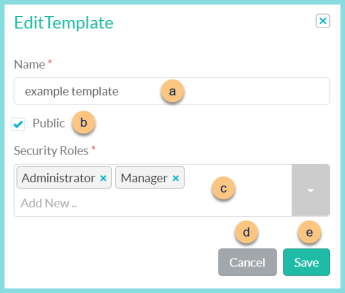
-
Name - enter a template name
-
Public - check to make the template available to other users
-
Security Roles - select the security roles that can access a Public template
-
Cancel - click to return to the previous screen without saving the template
-
Save - click to save the template
-
Reset - click to reset to defaults
-
Request Report - click to request report
Note: Report will appear in the bell icon when complete
Report Format
CSV file columns are as follows:
-
Date
-
# Reimbursable Student Paid Breakfasts
-
# Reimbursable Student Free Breakfasts
-
# Reimbursable Student Reduced Breakfasts
-
# Non-Reimbursable Non-Student Sold Breakfasts
-
# Non-Reimbursable Non-Student Earned Breakfasts
-
# Reimbursable Student Paid Lunches
-
# Reimbursable Student Free Lunches
-
# Reimbursable Student Reduced Lunches
-
# Non-Reimbursable Non-Student Sold Lunches
-
# Non-Reimbursable Non-Student Earned Lunches
-
Student A La Carte Sales Breakfast
-
Non-Student A La Carte Sales Breakfast
-
Student A La Carte Sales Lunch
-
Non-Student A La Carte Sales Lunch
-
Student Meal Sales Breakfast
-
Non-Student Meal Sales Breakfast
-
Student Meal Sales Lunch
-
Non-Student Total Sales Lunch
-
Total Breakfast Accruals (Breakfast prepaid account changes + Breakfast Cash/Coin + Breakfast Checks)
-
Total Lunch Accruals (Lunch prepaid account changes + Lunch cash/coin + Lunch Checks)
-
Breakfast ADJ
-
Lunch Over/Short
-
Bank Deposit Expected
-
Bank Deposit Actual